

 06.15
06.15
 ipod touch review

I had updated my iPad 1 to iOS 4.3 last night and it all worked fine. How to Enable Video Mirror in Original iPad without jailbreak?Video mirroring is only available on the iPad 2. It is not a feature of iOS 4.3 and does not support the original iPad.
Ipod Touch Review
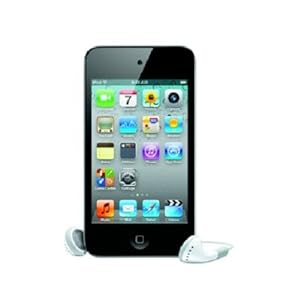
# # 8 GB capacity for about 2,000 songs, 10,000 photos, or 10 hours of video # Up to 40 hours of audio playback or 7 hours of video playback on a single charge # Support for AAC, Protected AAC (iTunes Store) and other audio formats; H.264, MPEG-4,
Ipod Touch Review
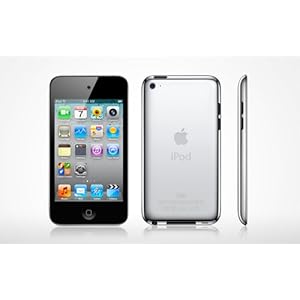
# One-year limited warranty # iPod touch has 8 GB capacity for about 2,000 songs, 10,000 photos, or 10 hours of video. # iPod touch has a 3.5-inch (diagonal) widescreen Multi-Touch display with 960-by-640-pixel resolution (326 pixels per inch). › See more technical details.

Ipod Touch Review
# iPod touch has one-year limited warranty. # IPod touch plays up to 40 hours of audio playback or 7 hours of video playback on a single charge. # Motion JPEG video codecs in M4V, MP4, MOV, and AVI formats
Jumat, 08 April 2011
Photos in PDF file not visible on iPad 2
A 6MB PDF file that contains photos works fine on my Mac. After I sync the file to my iPad 2 and open it in iBooks and GoodReader app, the text appears and layout remains unchanged but all photos are not visible.To fix the issue, just opening the original PDF file in Preview on your Mac and resaving to new file. Then taking it to the iPad and you are able to see all photos.

Cannot sign up for AT&T data plan on iPad 2 3G
I just got a new iPad 2 64GB WiFi + 3G model with the special pricing promotion and had to also purchase a data plan. When I tried to sign up for an AT&T data plan and tapped setting > Cellular Data > View Account, I got the error message "Your account type does not support the view account feature (H5006)."How to fix the AT&T issue with iPadThis probably means you are on a postpaid plan. You
Kamis, 07 April 2011
Device Management Tips
Here are some basic, nuts-and-bolts tips that have helped our program run smoothly. Keep in mind that we have 34 iPads in one shared cart, and those devices are shared between 5 classrooms in grades 1 and 2.
Consider color-coded cases for your iPad. It is much easier for first graders to remember “go get the blue ones” than to remember “go get devices 13-18." We use the brightly-colored MiniSuit by Vizu, which is available from amazon.com.
Make the wallpaper image a jpeg of the device number. You can also reinforce the color-coding by matching the image color to the case color.
Have a landing pad for devices on top of the cart, and keep it clear of clutter. We put a colorful placemat on top of the cart. The mat is wide enough to accommodate 2 small stacks of iPads. Student tech teams need a safe place to put their stack of 2-3 devices down while they carefully slide them into the cart one at a time. They also need a place to set them while they are closing and locking the cart; trying to do so while holding iPads doesn’t work so well.
If your iPad devices are shared between classrooms, consider creating an electronic sign-out. We use a spreadsheet created at docs.google.com. We set the sharing permissions so that anyone could edit the spreadsheet, and then iPad teachers bookmarked the spreadsheet for easy access. (Only the iPad teachers can edit, because they're the only ones who have the link.)
Keep headphones in small crates or baskets on top of the cart, and keep a fixed number of headphones in each basket. Because each class uses 6 iPads at a time during literacy centers, we keep 6 in a basket. When kids come to grab the iPads, a "headphone helper" grabs a crate. We use the small and easy to store Califone 3060AV headphones. The cords are a bit too long, but we like the individual volume control.
Keep microfiber cleaning cloths in a basket on top of the cart. Have your student iPad team polish screens as they put the devices away. KlearScreen works great for extra smudgy screens, but if you have kids using this sprayable product, provide careful instruction so you don't end up with soggy iPads. If you have sticker shock on the KlearScreen website, a very slightly damp lint-free cloth is a thriftier option for ferocious fingerprints.
Appoint someone -- a staff member, parent volunteer, or older student -- to check the cart at the end of each day, ensure the devices are plugged in, and lock the cart. It's a lot of extra responsibility to ask the teacher who hosts the cart to take care of this -- especially when he or she is already putting up with the added foot traffic of student iPad teams.
Rabu, 06 April 2011
iPad not correctly syncing calendars
My iPad calendar just shows all the entries 5 hours prior to when they are. My iMac and iPhone all see it correctly. Its Time zones all match and clocks are correct, but iPad is 5 hours early on any new calendar entries.Make sure the time zone for calendars is correctly set. On your iPad, tap Settings > Mail, contacts, calendars > Calendars > Time Zone Support.
MobileMe Aliases showed up in Mail on iPad
If you have some MobileMe aliases set up for your account, you can get all of the aliases to show up when composing e-mails on the iPad.How to get the aliases to show up on iPad* On your Computer, log into the MobileMe website.* In the mail section, select the 'cog' icon next to your name. And choose "Preferences" > "Aliases".* Deselect and reselect the aliases. Then click the Done button and log
AlwaysOnPC runs Flash & JAVA w/Chrome browser on iPad
AlwaysOnPC iPad Edition is a personal virtual PC that lets you use Chrome (with Java & Flash), a full Open Office suite & Dropbox on the iPad. With AlwaysOnPC, you can run Chrome and Java on your iPad with the fully synchronized themes bookmarks and tabs used to on the computer. The JAVA feature let you access web sites from iPad, including Runescape, PartyPoker, Evony, Zipforms. However, you


