Tampilkan postingan dengan label literacy. Tampilkan semua postingan

Selasa, 23 November 2010

Audio Recordings Promote Fluency


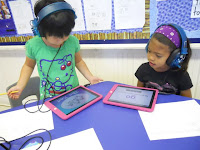
This week we used Recorder HD in guided reading groups to monitor our fluency. For the past few days we talked about how good readers practice reading a piece over and over to make it sound nice and smooth. One group of students read It's Super Mouse! by Phyllis Root during their guided reading groups and as a supplemental text during their independent reading time. To celebrate this text prior to moving on to a new book, a small group of students created an audio recording of It's Super Mouse. Now, all students have access to the text and audio recording at our classroom listening center. The small group of students who recorded the text debriefed on their recording and made plans for enhancing their fluency in future recordings. As they shared the recording with the class, it was obvious that the group gained confidence as readers. They were excited to hear themselves read the text and share the stories with their friends. Using the iPad to create audio books or as tools for children to self-reflect on their reading fluency is easy and fun! I can't wait to increase the opportunities for my kids to use this in the future.


Senin, 01 November 2010

Spelling practice, math, and word study

Second grade teachers were ready for more options in their morning literacy centers, so the students have begun using three apps to practice their weekly spelling words. Our spelling program is individualized, and each student works on his or her own list of words each week -- no small management task! The iPads are enabling students to have independent practice opportunities with their words. They're using the iPad's built-in Notes app, Whiteboard lite, and ABC Magnetic Letters Lite to write and type the words -- all free apps. At no extra cost,we now have a multimodal spelling center up and running in a matter of a day!

Last week, my colleague Kristin Ziemke Fastabend brought the whole cart of iPads to her room for her math lesson. Using Whiteboard lite, students wrote number sentences on the screen as Kristin modeled the problems with manipulatives on a projector. Students were fully engaged in the process of expressing their math knowledge -- if you've never heard students beg for more math problems, then you should have been there with our first graders!

Afterwards, Kristin remarked on how easy it was for her to help students as she circulate around the room. If a student forgot an equals sign, for example, she could use her own finger to show the child where it should have gone. The activity was more engaging and easier to manage with the iPads. Even the simple difference of starting with a "blank slate" by erasing the screen each time made it easier for Kristin to assess and check for understanding as she went along, and it enabled students to focus only on solving the problem at hand.

Another whole-class iPad activity took place in Begoña Cowan's room and was similar to the lesson that our Reading Specialist, Sally Tajkowski, wrote about in an earlier post. Each student sat on the rug with an iPad carefully on his or her lap while Begoña challenged them to sound out and spell certain word families using letter patterns they are studying. The students were fully engaged, and using virtual magnetic letters was the only thing that made this activity possible -- rather than digging noisily through a bucket of plastic magnetic letters, students were finding the letters they needed in the alphabet and focusing on the letter sounds themselves. I'll be posting a video in the next few days.

This week we will have our first visit from our intrepid iPad coach extraordinaire, Dr. Bruce Ahlborn. We can't wait!

Senin, 18 Oktober 2010

Reading Specialist Uses the IPads

I LOVE the iPad! Today was my second day using iPads with my guided reading groups. Each day I teach a phonics or word work mini lesson that corresponds with the guided reading book. Today I used the iPads with three first grade groups and a second grade group using the awesome ABC Magnetic Letters App. I demonstrated sounding out three letter words with my beginning readers in first grade. Instead of using a white board to draw each letter as I sounded it out, I used the iPad App to drag the letters on to the screen as I said the corresponding sound. The students were absolutely engrossed in this routine activity! I guess iPads are vastly more interesting to look at than a whiteboard! The students then used the iPads to sound out words on their own. It was wonderful to see how engaged the children were in sounding out and writing words. This App replaces both the whiteboard and magnetic letters that we sometimes use for word work. It can be frustrating for kids to search and search for a magnetic letter they can't find when creating words. With this App, the time it took to complete the minilesson was nearly cut in half because the letters are in alphabetical order and easier to find.

During the minilesson for a different first grade group, we worked on word families, such as hear, dear, and fear. It was so easy for children to write "ear" on the iPad and switch out the first letter to create new words in the family. During my second grade group, I used the iPads to teach about different endings on base words such as s, ed, and ing. The students immediately understood that the base word stays the same, such and the word "jump" and by switching out the "s" for the "ed" and "ing", it changes the meaning of the word.

In all three lessons, the children were excited to be using the iPads, the iPads had a meaningful and useful connection to the lesson, and their use decreased the total time to complete the minilesson. It's a win, win, win!

Selasa, 12 Oktober 2010

Fluency recordings

We're starting fluency recordings this week! We'll be testing out some screen shots we made to help students navigate Blue Fire and a self-check rubric to guide their practice.

Rabu, 06 Oktober 2010

First Graders rock the iPad

The first graders had been waiting patiently for their turn with the iPads, and this week they got their chance. I modified the sight word video format to include only 10 words instead of the 25 I had given the second graders, and this was a good move. I am going to stick with that format for both first and second graders. It's much easier and more pleasant for the kids to complete a 10 word video and start a second one if time permits than to start a 25 word video and not finish. You can subscribe to download our sight word videos here.

I was especially excited by how the kids are interacting with the content in the videos. They were reading and writing the word, then listening to the word, and cheering quietly for themselves when the movie confirmed that they had read the word correctly. I heard repeated exclamations of, "I read that one right!" and "I knew that one!" It's always tricky to design materials that will have kids engage actively with the content, rather than just clicking along, and it seems that these videos have worked for this group of kids.

I'll also say this about making media for kids: use music. Danceable music. I deliberated about this a little bit, but I found that having a little beat running through these videos really kept things fun and engaging for the kids and seemed to help them focus. Plus, who doesn't like a good beat?

Selasa, 05 Oktober 2010

109 Loves the iPads!

Hello! I am Kelly Johnson and I teach reading and writing with the 2nd graders at Burley in the mornings. My students are so excited about using iPads in the classroom, as am I. I am new to "blogging" so I apologize if my first few appear a bit off-centered and not totally awesome.

We began using iPads in our classroom last Friday. Ms. Skibba came in and talked to our whole class about how we will be using them in class and the proper procedures for use. We were all so excited, we couldn't wait to get started.


In order to get the students acclimated with using the iPads, we began by having them watch a video to practice sight words. Students had to learn how to adjust the volume, pause and play the video and rewind to the beginning.


As a sight word came up, students paused the video then wrote the word on a paper. This exposed them to the seeing a word visually, hearing it in a sentence, and writing the word themselves.


The students worked their way through 25 words and then were able to switch programs and go into an application called "Spell Blocks" to practice spelling words. This gave students an opportunity to practice moving around on the iPad, switching programs, and using their fingers to navigate.


I know my students love having the iPads incorporated into our reading program. I think it gives them the opportunity to to utilize yet another tool for learning. I look forward to updating this blog as we continue to use the iPads and incorporate more tools for the students to use. 109 is so very grateful for this opportunity!

Kamis, 30 September 2010

Taking Ownership


One of our second grade classes is on its third day using the iPads in their literacy centers, and another class just got started today. It was interesting to sit in on both our "veteran" (of three days) class and our beginning class and notice the difference a few days has made. In the more experienced class, students navigated smoothly to a new sight word video, reset the video upon finishing, and then started the Spell Blocks with Sight Words app. Without prompting, students began to explore the settings in Spell Blocks with Sight Words to adjust the challenge level to meet their needs.
In contrast, the beginning class was still in teacher-directed mode and struggled a bit just to get the movie to play and pause as they wished.

Navigation issues aside, I feel the veteran class is starting to think differently about the iPad and to look for ways they can customize it to their needs. This is something we anticipated
would happen, and I am
glad to see it happening so soon -- so our planning discussions will now turn to differentiation and how we can use the iPads to customize the learning experience for individual students.

Students are also taking increasing ownership of the management of the equipment. Each room has a team of three students who go to the cart, unplug the iPads, and carry them to the classroom. They take this job very seriously!

There has been so much progress over the last three days, and I can't wait to see what next week will bring.


Selasa, 28 September 2010

First day with student literacy centers!


Today our second graders started using the iPads in their literacy centers. We set up the iPads so there are three screens of apps -- one for literacy practice, one for art and publication, and a third for teacher apps. As each group of 5 students came to the center, I showed them how to navigate through the screens and, specifically, how to navigate a video. There was a little confusion between the video progress bar (at the top) and the volume slider (near the playback controls), so that was something we talked about.

For today's content, we used a sight word video that prompted students to read the word silently, pause the movie, write the word, and then listen to the word and a sentence including the word. Sight word recognition will help second graders build reading fluency and comprehension, and practicing sight words is always an important activity in the early months of the school year. Without exception, the activity went smoothly and students were engaged throughout. I am thinking of making a companion video to this one that will present the words in more rapid succession to help with memorization. The current video is more of a guess-and-check model, where students can check their reading by hearing the word after they've had some time to read it to themselves.

Tomorrow we will use the Spell Blocks with Sight Words application as a second literacy center activity, and then begin the fluency recordings. I will also teach the student tech teams how to set up the literacy center themselves. We are so excited to be underway!


Design by Free WordPress Themes | Bloggerized by Lasantha - Premium Blogger Themes | Lady Gaga, Salman Khan